


Portfolio Week 3: Sending push notifications, Launching Google maps and Scraping images from a web

In this exercise, I will try and write python programs to send push notifications using "PushBullet" to smartphones, launching Google maps and Scraping images from a website.
From what I know, there are different notification service but I will be using "PushBullet" service to try and send a notification to myself.

Firstly, I have to create an access token to grant full access to my account.

The python program

Then I have to install the "PushBullet" python library for PushBullet service to work. I use command prompt to do that. I also use the command prompt to execute my python program.

Installed the "PushBullet" app on my phone and received the message

Launching Google maps
This exercise, I will try launching Google maps through "Pyperclip"
First, I install the pyperclip library using the command prompt. This is needed for the program to be working.

The code of the program:

I executed the program address as "Space Needle Seattle" which opens up the Google Map using my default browser

This experience taught me how to open a browser through a program.
Scraping images from a website
The goal of this exercise is to download book cover images from amazon through a python program. Using a web scraping the extract information from a website.
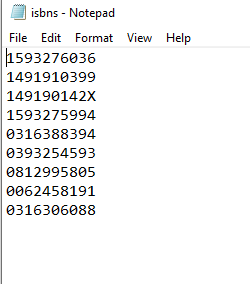
Firstly, I created a text file named isbns.txt and populate it with the following:
Then I create a python script:

Executed the program through command prompt and it started to download images

The images have been installed on my local PC.

Through this experience, I learned that we can download a huge amount of data fast using this method.


Comments